



 Contents
Installing pvs-golang
Windows
Download the PVS-Studio installer for Windows by the link.
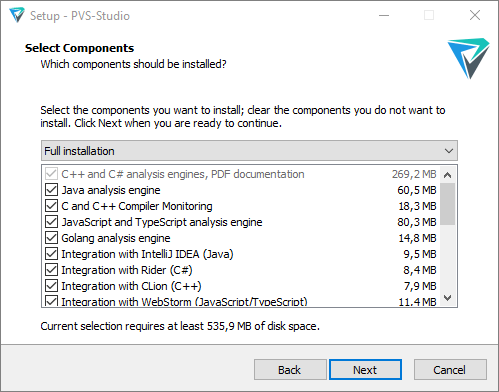
To install pvs-golang, select Golang analysis engine. On the installer page, you can also choose to install the GoLand plugin.
Linux
Installation from repositories
For debian-based systems
Before Debian 11 and Ubuntu 22.04:
wget -q -O - https://wcdn.pvs-studio.com/etc/pubkey.txt | \
  sudo apt-key add -

sudo wget -O /etc/apt/sources.list.d/viva64.list \
  https://wcdn.pvs-studio.com /beta/etc/viva64.list

sudo apt-get update
sudo apt-get install pvs-golang
Debian 11 and Ubuntu 22.04 and newer:
wget -qO- https://wcdn.pvs-studio.com/etc/pubkey.txt | \
  sudo gpg --dearmor -o /etc/apt/trusted.gpg.d/viva64.gpg

sudo wget -O /etc/apt/sources.list.d/viva64.list \
  https://wcdn.pvs-studio.com/beta/etc/viva64.list

sudo apt-get update
sudo apt-get install pvs-golang
For yum-based systems:
wget -O /etc/yum.repos.d/viva64.repo \
  https://wcdn.pvs-studio.com/beta/etc/viva64.repo
yum update
yum install pvs-golang
For zypper-based systems:
wget -q -O /tmp/viva64.key \
  https://wcdn.pvs-studio.com/etc/pubkey.txt

sudo rpm --import /tmp/viva64.key
sudo zypper ar -f https://wcdn.pvs-studio.com/beta/rpm viva64

sudo sed -i \
  's|enabled=1|enabled=1\ngpgkey=https://wcdn.pvs-studio.com/etc/pubkey.txt|' \
  /etc/zypp/repos.d/viva64.repo

sudo zypper refresh
sudo zypper install pvs-golang
Manual installation
Download archive with the analyzer by the link.
To install, use the following command:
tar -xzf pvs-golang-VERSION.tar.gz
sudo ./install.sh
macOS
Installer
Download the .pkg installer by the link.
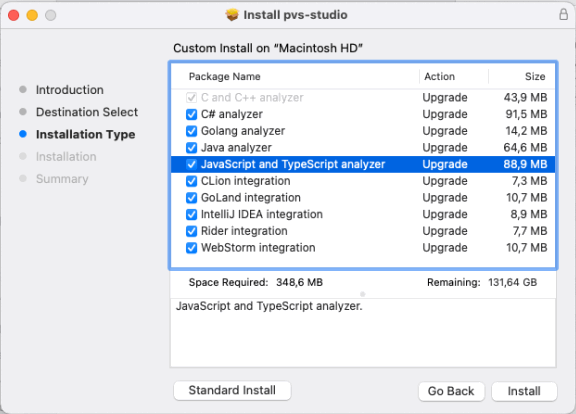
Run the .pkg file and follow the instructions. On the Installation Type page, click the Customize button and select the components you want to install.
Archive
You can also download the archive with the analyzer by the link.
To install from the archive, run:
unzip pvs-golang-VERSION.zip
sudo ./install.sh
Was this page helpful?
