
Our website uses cookies to enhance your browsing experience.

Webinar: Integrating SAST into DevSecOps - 19.03

Many static analyzers enable suppressing individual warnings directly in code via special comments. Over time, the number of such comments in projects increases. Some of them lose their relevance yet remain in the code, like dusty magnets on a fridge.
In this article, we'll examine the scope of the issue. We selected a few projects and checked them using the new PVS-Studio feature, which can detect redundant false alarm markers. Let's take a look at the results.

There are several reasons why false alarm markers can appear in code. Sometimes, developers choose not to address a warning right away. They think, "I'll look at it later when I have time."
Picture 2. Avengers: Endgame / Marvel Studios
Another possibility is that the analyzer got it wrong. This does happen: the tool detects an issue that doesn't actually exist, developers check the code and confirm that everything is fine, then, they add a false alarm marker to suppress the warning.
However, analyzers are evolving, old false positives are disappearing, while false alarm markers remain. So, the marker that once worked so well may now be hiding real warnings. Over time, developers end up with a whole collection of these artifacts, and if they aren't natural collectors, it's better to get rid of them.
Our task was to create a utility that, based on an analysis report, would locate special markers in the codebase and delete the irrelevant ones. We considered two approaches for its implementation.
The first one relied on a utility that would just recursively scan the specified directory, find comments in all files, and delete them based on the analysis report. At first glance, it sounded simple. Still, there were some complications, of course.
Firstly, the code can contain false alarm markers in its various sections:
1. At the end of a string:
int a1; //-V8612. Among other markers:
int a2; //-V561 //-V861 //-V7733. Inside a comment:
int a3; /* comment //-V861 */4. In a string literal:
std::string a4 = "//-V861"; //-V861
std::string a5 = "hello //-V861 \" world"; //-V861
In other words, the utility should understand the context of each text file, including the programming language used.
Secondly, is it necessary to check all files? At first glance, it might seem enough to scan only text files, but which of them end up in the actual program? Projects can be cross-platform, and files involved in compilation on one platform may not be used at all on another.
These two details alone made it clear that we would have to take a different path. We wanted to create a lightweight utility that simply removes comments from source code.
We approached the task from a different angle. The analyzer already displays the warnings necessary for the utility to work. It already collects information about false alarm comments. And it fully understands the context of the programming language, meaning it can distinguish between a string literal containing a comment and the control comment itself. So, if we let the analyzer decide which comments to delete? Here's what it gives us:
This approach has just a couple of drawbacks:
In the end, the pros outweighed the cons.
{
  "version": 1,
  "files": [
    {
      "path": "/path/to/file1",
      "hash": "d82b7bac944b7da5c9a13d0c48d285345368790f",
      "lines": [
        {
          "line": 1,
          "markers": [
            {
              "code": 567,
              "columns": { "begin": 1, "end": 2 },
              "offsets": { "begin": 1, "end": 2 }
            },
            {
              "code": 730,
              "columns": { "begin": 34, "end": 43 },
              "offsets": { "begin": 34, "end": 47 }
            }
          ]
        },
        {
          "line": 10,
          "markers": [
            {
              "code": 568,
              "columns": { "begin": 3, "end": 7 },
              "offsets": { "begin": 3, "end": 7 }
            },
            {
              "code": 609,
              "columns": { "begin": 9, "end": 15 },
              "offsets": { "begin": 9, "end": 20 }
            }
          ]
        }
      ]
    },
    {
      "path": "/path/to/file2",
      "hash": "9bc0ced475c2df7103f34db6c1b407b7db79b4a4",
      "lines": [
        {
          "line": 1,
          "markers": [
            {
              "code": 557,
              "columns": { "begin": 5, "end": 8 },
              "offsets": { "begin": 5, "end": 8 }
            },
            {
              "code": 777,
              "columns": { "begin": 63, "end": 79 },
              "offsets": { "begin": 63, "end": 84 }
            }
          ]
        },
        {
          "line": 10,
          "markers": [
            {
              "code": 501,
              "columns": { "begin": 20, "end": 25 },
              "offsets": { "begin": 20, "end": 27 }
            },
            {
              "code": 509,
              "columns": { "begin": 33, "end": 39 },
              "offsets": { "begin": 33, "end": 42 }
            }
          ]
        }
      ]
    }
  ]
}
In this report:
Next, the utility simply reads the report and deletes the markers at the specified "coordinates."
So far, we've assumed that the project being analyzed runs on a single platform. In reality, most projects are cross-platform, and warnings may differ between platforms. A marker may be irrelevant on one platform but still suppress a warning on another.
To handle this, we added a report merge mode to the utility. If all reports contain information about a redundant marker, you can still delete it. Otherwise, the marker should remain in the source code.
Now that everything is ready and the information about redundant markers has been collected, the file can be edited. Or not?
First of all, it's better to make sure that the file hasn't changed since the last analysis run. Fortunately, we've added the checksum for this purpose. What if something goes wrong, though? Nobody wants to mess up their source files. That's why a copy of the source file is created, the modifications are applied to this copy according to the input data, and the original file is then replaced automatically. If the process is interrupted, the source file remains unchanged.
To address the issue described above, we added a special tool to PVS-Studio—pvs-fp-cleaner.
To suppress false positive warnings, PVS-Studio supports the following control comments:
//-Vwarning-numberThe warning-number is the diagnostic rule number.
The example:
if (a == b && a == b && 0 / 0 == 0) //-V501 //-V609If you're using a hash code in the line to suppress warnings (the suppression is removed if the original line changes), the utility also handles these markers:
//-VH"hash"The hash is the hash code of a line excluding comments.
The example:
if (a == b && a == b && 0 / 0 == 0) //-V501 //-V609 //-VH"12345678"The first step is to analyze the project in a special mode that collects data on potentially redundant false alarm markers:
pvs-studio-analyzer analyze --redundant-false-alarms=/path/to/report.json \
                            --sourcetree-root=/path/to/project-root \
                            ....
The result is a report containing information about redundant false alarm markers based on data collected during the analysis.
Key parameters:
--redundant-false-alarms is a path to the report;--sourcetree-root is the project root for correct relative path generation.Once the reports are ready, we can move on to the most important part: cleaning up the codebase. To do this, we'll use pvs-fp-cleaner.
Since warnings may differ across platforms in cross-platform projects, we need to specify the reports received for each platform to ensure the utility works correctly.
How to run it:
pvs-fp-cleaner cleanup \
               --sourcetree-root=/path/to/project \
               PATH...
Where:
cleanup is the cleanup mode;--sourcetree-root is a root project directory;PATH... is a report list.The example:
pvs-fp-cleaner cleanup \
               --sourcetree-root=/home/user/project \
               /home/user/windows_report.json \
               /home/user/linux_report.json \
/home/user/macOS_report.jsonIf multiple reports are generated for a cross-platform project, and it's necessary to work with a single set of data, use the merge mode:
pvs-fp-cleaner merge \
               --sourcetree-root=/path/to/project \
               --output-file=/path/to/merged_report.json \
               PATH...
Where:
merge is the merge mode;--output-file is a final report.Before removing false alarm markers, it may be useful to assess the scale of changes in the code. For this reason, we've added a preview mode for generating reports:
pvs-fp-cleaner report \
               --sourcetree-root=/home/user/project \
               --output-file=/home/user/report_for_IDE_plugin.json \
               PATH...
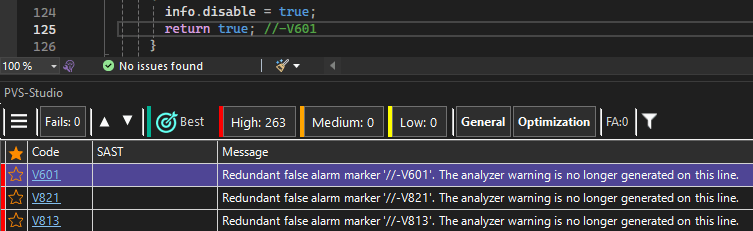
The report can be opened in the IDE:
We tested the utility on three different projects:
Now, let's see how many false alarm markers are still kicking, and how many should've been retired long ago.
We'll start with our tool.
Here are the results:
In other words, about half of the markers in the project were redundant. This clearly demonstrates the analyzer's progress over the years.
Moving on to Unreal Engine.
The percentage of redundant markers here is much lower than in PVS-Studio, but in absolute terms, the number still amounts to several hundreds. UE also has a complex codebase with extensive use of macros and templates, which results in more false positives.
|
Project |
Total number of markers: |
Redundant markers |
Share |
|---|---|---|---|
|
PVS-Studio |
744 |
324 |
43.55% |
|
Unreal Engine |
2 215 |
270 |
12.19% |
In most cases, everything is quite predictable. For example, here's a single marker:
if (    Name.Contains(CtrlPrefix)
     && !DynamicHierarchy->Contains(....)) //-V1051
And here are multiple markers in a row:
for (....) //-V621 //-V654In such cases, it's pretty simple: if warnings stop popping up, delete the marker.
Sometimes, however, there are more abstract cases, for example:
// The warning disable comment can can't be used in a macro: //-V501The marker is inside the comment. Technically, it's redundant, but contextually, it's part of the text.
This sparked a lively debate in our team: some felt the marker should be removed since suppression was no longer relevant, while others argued it was a "comment within a comment" and should be left untouched.
Eventually, the first group prevailed, and now the utility removes such markers.
What do you think? Share your thoughts in the comments!
Here's another similar case:
LinkerSave.AdditionalDataToAppend.Add(....); \
// -V595 PVS believes that LinkerSave can potentially be nullptr at
The utility removes the marker while leaving the rest of the text intact:
LinkerSave.AdditionalDataToAppend.Add(....); \
// PVS believes that LinkerSave can potentially be nullptr atGiven these cases, we recommend running pvs-fp-cleaner under the supervision of a version control system. In ambiguous situations, it's better to check the diffs beforehand, consider the changes, and only then hit commit.
The results show that hundreds of redundant markers can accumulate in actively developed projects. This illustrates the analyzer evolution effect: tools grow smarter, but redundant false alarm markers persist.
The automated cleanup of such markers reduces noise, simplifies code maintenance, and lowers the risk that a real warning will be obscured by a long-forgotten marker.
The feature for detecting and removing redundant false alarm markers is available in PVS-Studio starting with the 7.41 version.


0
0
0
 3343
3343
 1
124
0
119
0
1
124
0
119
0


0