
Our website uses cookies to enhance your browsing experience.



PVS-Studio static code analyzer has been on the market for 18 years now. Over this time, it has grown to support C, C++, C#, and Java. We don't plan to stop at these languages. This article covers the development of a new JavaScript/TypeScript analyzer, which we release very soon.

Given the enduring popularity of the ECMAScript language family among programmers, supporting an analyzer for one of the most popular language stacks was only a matter of time. As a stack grows in popularity, so does its ecosystem, and in the case of JavaScript/TypeScript, that ecosystem is the envy of many. As a programmer friend once said: "If you face some problem, there's already a library for JavaScript that solves it."
Competition from both paid and free tools is fierce. So, our goal now is to build a stable and reliable platform that we can steadily develop and expand, eventually catching up to other market solutions. That is one reason we intend to release early: the EAP has already started, and the MVP release of the analyzer is scheduled for this August.
In this article, we explain how the new analyzer works and what new architectural solutions we applied.
Every analyzer starts with a language model—more specifically, with an abstract syntax tree. After all, the analyzer needs some way to work with source code.
We began by tackling this very problem. The choice was clear: as we want both a syntax tree and a semantic model for JavaScript and TypeScript at the same time—plus support from the language developers—the TypeScript compiler has no competition. It can parse both languages, and its support is guaranteed as long as TypeScript itself evolves.
Look at the resulting AST using the factorial function as an example:
function factorial(n) {
  let result = 1;
  for (let i = 2; i <= n; i++) {
    result *= i;
  }
  return result;
}
For this, we get the following tree (see the spoiler).
SourceFile:
  FunctionDeclaration:
    Identifier
    Parameter:
      Identifier
    Block:
      VariableStatement:
        VariableDeclarationList:
          VariableDeclaration:
            Identifier
            NumericLiteral
      ForStatement:
        VariableDeclarationList:
          VariableDeclaration:
            Identifier
            NumericLiteral
      BinaryExpression:
        Identifier
        LessThanEqualsToken
        Identifier
      PostfixUnaryExpression:
        Identifier
      Block
        ExpressionStatement:
          BinaryExpression:
            Identifier
            AsteriskEqualsToken
            Identifier
      ReturnStatement:
        Identifier
  EndOfFileToken
You can play with it yourself here.
You may also notice small differences between this AST and more "academic" ones. First, the tree contains tokens, even though tokens usually belong to a parse tree. Second, their names reflect visual representation rather than semantic meaning. In the example above, we have AsteriskEqualsToken, but the TypeScript compiler also has a token with the wonderful name DotDotDotToken for the spread operator.
A syntax tree alone is not enough. Let's say we want to catch a missed assignment when replacing a character in a string:
function replaceFoo(variable: string): string {
    variable.replace("foo", "bar")
    return variable
}
Here, the result of replace isn't saved anywhere. The analyzer could issue a warning about every replace in the program, but that would produce too many false positives. To ensure that this is the replace we need, we have to verify that it is called on an object of the needed type and that the argument types match the parameter types.
How do we find out the type of the variable identifier? Manually looking up definitions for every identifier node is overkill, and outside such simple cases it's non-trivial—with hoisting it would be much more complicated.
This is where semantic code analysis comes in, helping us find variable types and scopes. And that's another reason we chose the TypeScript compiler. It can:
In short, the compiler really has everything we need. Still, the adventure is just beginning.
The Java team was assigned to develop the new analyzer. Perhaps it's because JavaScript matches Java by 50%. Just kidding. Or not quite kidding.
Anyway, the TypeScript compiler is written in TypeScript (as expected). Less expected is that it'll soon be completely rewritten in Go. This raises two major problems:
The solution was obvious—split the analyzer architecture into two applications.
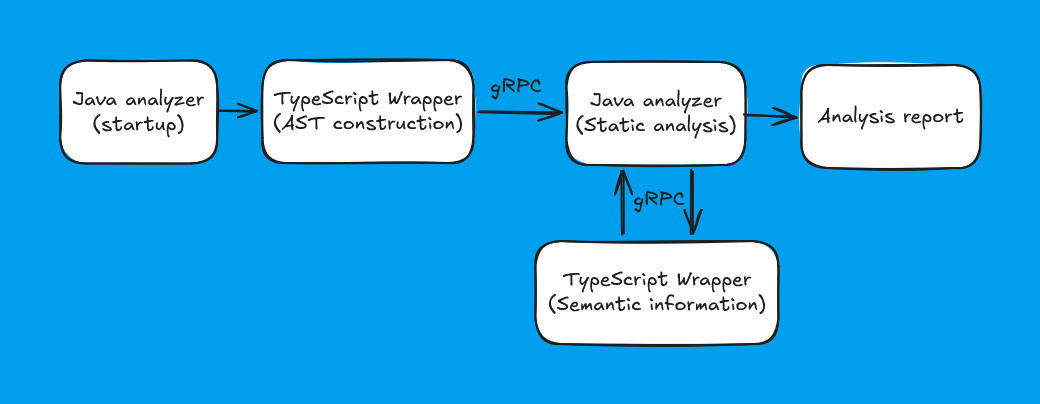
So, we wrap the model built by the TypeScript wrapper into protobuf and then pass it via gRPC. We've written two separate articles (first, second) about the intricacies of this process. Here are the key points:
if branches always have braces, even if the language makes them optional.With this approach, we managed to mitigate the drawbacks mentioned: most development happens in Java, and we can replace the current wrapper for the TypeScript compiler with any other. We'll have to do this when TypeScript 7 is released, at which point we'll rewrite our wrapper in Go to match the compiler.
Traditionally, we have built code analyzers by taking a framework in the analyzed language for that same language, and then building the analyzer infrastructure around it.
We used to reuse frameworks mainly for to the surrounding ecosystem—plog‑converter and similar tools. Although in some cases we also borrowed analysis technologies, such as data‑flow analysis from C++ into our own Java analyzer. The traditional approach had advantages:
But it also had disadvantages:
And that last point turned out to be decisive for us. Besides JavaScript/TypeScript and Go, there will be support for other languages? What? Yes! Stay tuned for updates :)
At this point, a thought occurred to us: why not build a common infrastructure for all languages? Well, most programming languages share many things: variables, control structures, operators, and so on. With a generalized language model, we wouldn't need to duplicate diagnostic rules, and with a common core, we wouldn't need to duplicate all the rest of the infrastructure.
The idea of a generalized tree is not revolutionary. It's usually called UAST, and JetBrains, for example, uses it for their IDEs. We liked the acronym CAT so much that we named our tree after it: Common Abstract Tree.
The idea is simple:
I think we'll release more detailed material on this topic in the future, but for now we'll stick to general principles. We can illustrate the approach with a simplified analog of V6001, which detects identical operands in a binary operation—errors like a == a. Obviously, such a construct is valid in almost any language. It breaks down into typical language "building blocks":
We can roughly understand what we're looking at, but it's not obvious what to do next. So next, let's look at error detection on the tree.
This is how diagnostic rules work.
Let's get back to the error above. To find this error, we define a rule. It will check the binary expression's type (multiplication, for instance, is not of interest). It will also check that the left and right operands share the same type, and that these operands are the same. Handling chains of binary operands like a == 0 && b == 0 && c == 0 is less trivial, but the idea is roughly the same.
This pattern can find the error in any language, but that doesn't mean languages can't have their own specifics. In JavaScript, there is a foo && foo.bar && foo pattern. It appears in return statements where we return a variable value from a condition after a preliminary check.
For such cases, we provide several extension points for a general diagnostic rule: before it triggers; filtering intermediate results; and after the rule triggers. In our case, after the rule triggers on identical variable identifiers, we can check whether one of them is the last in the condition, thus eliminating false positives.
And the normal mode of operation—where we write language‑specific diagnostics is still available. Given our strong focus on finding typos in code, we needed to keep that flexibility.

As we took an unconventional path, our architecture turned out to be noticeably more complex than usual:
We can represent it simply like this:
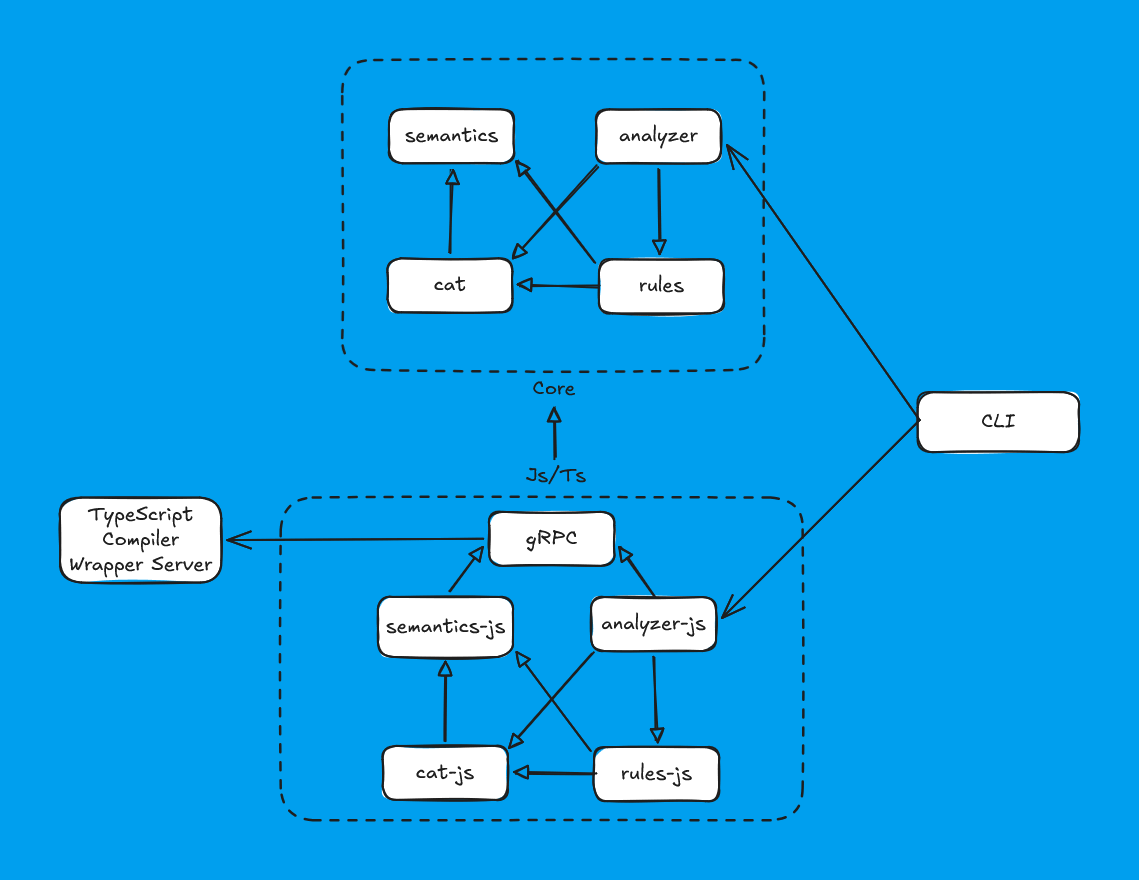
Despite the increased complexity of the system, from the first tests it performed well.
The innovations didn't stop there. We also use compilation to a native image via GraalVM, which enabled us to switch to the latest Java versions. Also, we use DI based on Micronaut, and overall, we try to keep up with new industry trends.
By the way, this story is amusingly ironic. We have no continuity with the previous Java team that created Java analyzer—we didn't overlap in time. However, a spiritual continuity seems to exist. We independently came to a similar decision: not to follow the beaten path, but to explore new ways of creating analyzers and try to reuse existing work. Only they integrated data-flow analysis for C++ into Java, while we attempted to build a unified platform for analyzing different programming languages.
To make it as easy as possible to integrate the static analyzer into the development process, we are developing plugins for the tools developers use. During the EAP, we provide a WebStorm plugin to run the analyzer from the IDE.
At this stage, the plugin allows you to:
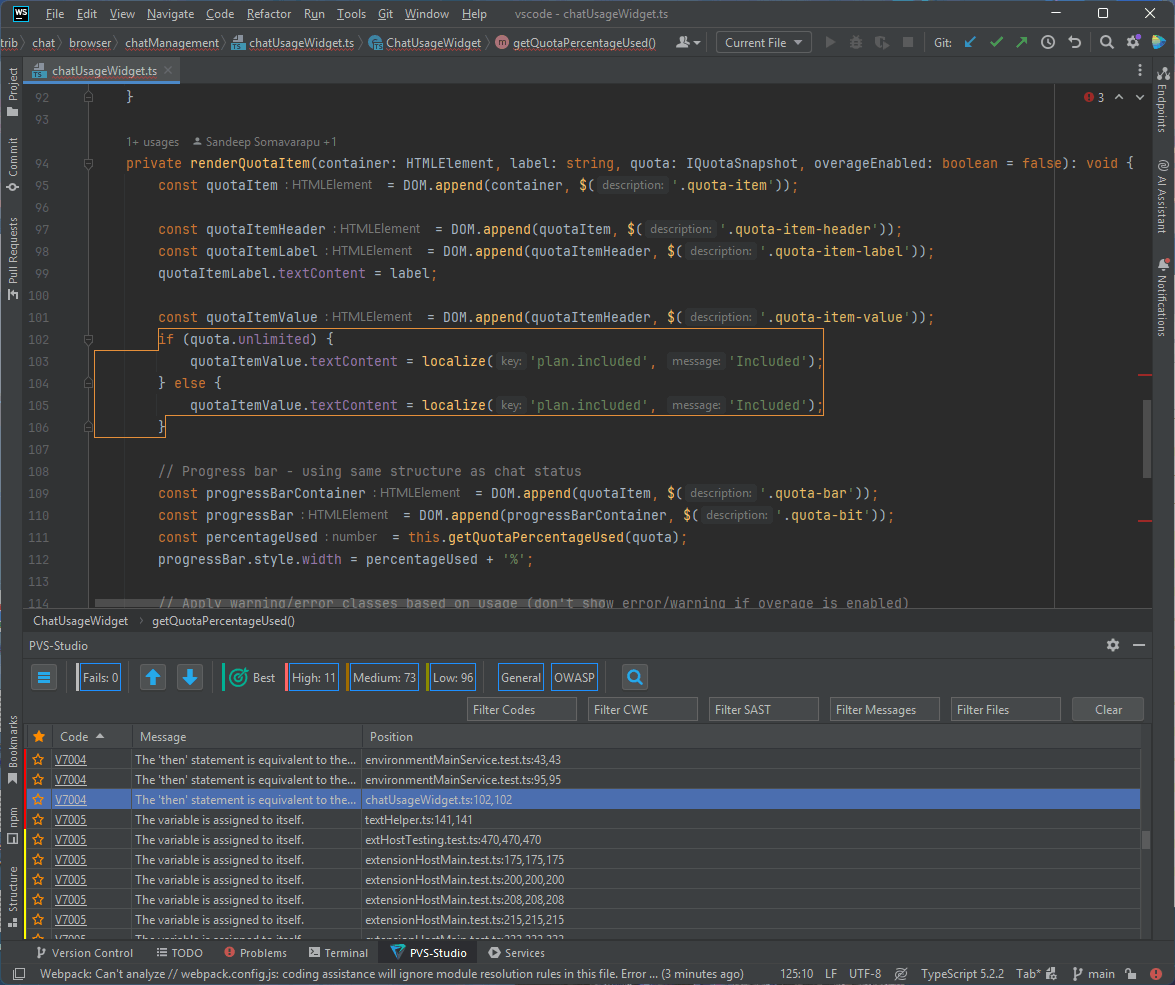
Later, when the MVP is ready, you'll be able to run the JS/TS static analyzer using our Visual Studio Code extension. At the same time, the WebStorm plugin will gain more extensive functionality.
If you don't use WebStorm for development, you can still use the analyzer core via the CLI. You'll also be able to view reports—for example, in our PVS‑Studio Atlas tool or in a browser.
For testing JS/TS analyzer, we reused our special tool called Self‑Tester. It works with a base of open‑source projects, performing regression testing of the analyzer. Here are the steps we follow:
This approach ensures that useful warnings won't disappear as a result of changes to the analyzer's code.
Currently, the list of projects for the JavaScript Self‑Tester is:
As for TypeScript analyzer, we're still working on the list of projects.
Here's an article where we describe in detail how we develop and test diagnostic rules. Overall, nothing has changed for the JS/TS analyzer.
Well, what story about a new static analyzer would be complete without demonstrating what it can find? Next, we'll show you what the static analyzer found in our Self‑Tester base and in various open‑source projects.
TypeScript analyzer will be available later than the JavaScript one during the EAP, but we were able to test it ahead of time. Just don't tell anyone :)
So next, we'll look at errors in both JavaScript and TypeScript code.
The first error comes from the JavaScript linter ESLint:
function isFirstBangInBangBangExpression(node) {
  return (
    node &&
    node.type === "UnaryExpression" &&
    node.argument.operator === "!" &&
    node.argument &&
    node.argument.type === "UnaryExpression" &&
    node.argument.operator === "!"
  );
}
The PVS-Studio warning: V7001 The operands of the '&&' operator are equivalent. space-unary-ops.js 109
The analyzer reports identical operands of the binary "AND" expression.
At first glance, it might seem like just an extra check, nothing critical. The method name and its JSDoc clarify the situation:
/**
* Check if the node is the first "!" in a "!!" convert to Boolean expression
* @param {ASTnode} node AST node
* @returns {boolean} Whether or not the node is first "!" in "!!"
*/
This method checks whether the expression is a unary ! operator that contains another unary ! operator. Such a construction of unary operators in JavaScript casts the expression to a Boolean type.
So, what goes wrong here? The expression !!1 at the AST level looks like this:
UnaryExpression (!)
└── argument: UnaryExpression (!)
    └── argument: value (1)
In the code snippet above, instead of checking the outer unary expression's operator, we check only the inner unary expression's operator ! twice.
Let's move to our dear Visual Studio Code:
this._dispooables.add(
  Event.any<....>(
    _fileService.onDidChangeFileSystemProviderRegistrations,
    _fileService.onDidChangeFileSystemProviderCapabilities
)(e => {
  const oldIgnorePathCasingValue = schemeIgnoresPathCasingCache.get(e.scheme);
  if (oldIgnorePathCasingValue === undefined) {
    return;
  }
  schemeIgnoresPathCasingCache.delete(e.scheme);
  const newIgnorePathCasingValue = ignorePathCasing(URI.from(....);
  if (newIgnorePathCasingValue === newIgnorePathCasingValue) {
    return;
  }
  for (const [key, entry] of this._canonicalUris.entries()) {
    if (entry.uri.scheme !== e.scheme) {
      continue;
    }
    this._canonicalUris.delete(key);
  }
}));
The fragment is quite large, and it's hard to spot the error without hints. You can try to find it yourself if you'd like.
What does the analyzer say? The PVS-Studio warning: V7001 The operands of the '===' operator are equivalent. uriIdentityService.ts 63
To make it clearer, here's the exact snippet with a bug:
const oldIgnorePathCasingValue = schemeIgnoresPathCasingCache.get(e.scheme);
if (oldIgnorePathCasingValue === undefined) {
  return;
}
schemeIgnoresPathCasingCache.delete(e.scheme);
const newIgnorePathCasingValue = ignorePathCasing(URI.from(....);
if (newIgnorePathCasingValue === newIgnorePathCasingValue) { // <=
  return;
}
....
In the conditional statement, the same constant is compared with itself.
This may be the result of a failed refactoring. The changes appeared in this commit. There, similar code was part of the _handleFileSystemProviderChangeEvent method and looked like this:
if (currentCasing === undefined) {
  return;
}
const newCasing = this._calculateIgnorePathCasing(event.scheme);
if (currentCasing === newCasing) {
  return;
}
The erroneous fragment and this one are similar, only the naming differs. And the old snippet didn't have this error: it compared different constants.
That's not the only thing the analyzer found. Look at another code snippet:
private renderQuotaItem(
    container: HTMLElement,
    label: string,
    quota: IQuotaSnapshot,
    overageEnabled: boolean = false
    ): void {
  const quotaItem = DOM.append(container, $('.quota-item'));
  const quotaItemHeader = DOM.append(quotaItem, $('.quota-item-header'));
  const quotaItemLabel = DOM.append(quotaItemHeader, $('.quota-item-label'));
  quotaItemLabel.textContent = label;
  const quotaItemValue = DOM.append(quotaItemHeader, $('.quota-item-value'));
  if (quota.unlimited) {
    quotaItemValue.textContent = localize('plan.included', 'Included');
  } else {
    quotaItemValue.textContent = localize('plan.included', 'Included');
  }
  // Progress bar - using same structure as chat status
  const progressBarContainer = DOM.append(quotaItem, $('.quota-bar'));
  const progressBar = DOM.append(progressBarContainer, $('.quota-bit'));
  const percentageUsed = this.getQuotaPercentageUsed(quota);
  progressBar.style.width = percentageUsed + '%';

  if (percentageUsed >= 90 && !overageEnabled) {
    quotaItem.classList.add('error');
  } else if (percentageUsed >= 75 && !overageEnabled) {
    quotaItem.classList.add('warning');
  }
}
As with the previous fragment, I suggest you find the error yourself first.
The PVS-Studio warning: V7004 The 'then' statement is equivalent to the 'else' statement. chatUsageWidget.ts 102
It refers to the following condition:
if (quota.unlimited) {
    quotaItemValue.textContent = localize('plan.included', 'Included');
  } else {
    quotaItemValue.textContent = localize('plan.included', 'Included');
  }
  ....
}
Both then and else branches are identical, so the check doesn't make sense. Only the project authors know what was intended here.
And we're moving on. Finally, let's look at two interesting spots in VS Code.
Here's the first one:
for (const namedImport of namedImports) {
  const isTarget =
    namedImport.name.getText() === functionName || (namedImport.propertyName &&
        namedImport.propertyName.getText() === functionName);
  if (!isTarget) {
    continue;
  }
  const searchName = namedImport.propertyName
                        ? namedImport.name
                        : namedImport.name;
  const refs = service.getReferencesAtPosition(
    filename,
    searchName.pos + 1
  ) ?? [];
  for (const ref of refs) {
    if (ref.isWriteAccess) {
      continue;
    }
    const calls = collect(
        sourceFile,
        n => isCallExpressionWithinTextSpanCollectStep(ref.textSpan, n)
    );
    const lastCall = calls[calls.length - 1] as ts.CallExpression | undefined;
    if (lastCall) {
      localizeCallExpressions.push(lastCall);
    }
  }
}
The PVS-Studio warning: V7012 The conditional expression always returns the same value. nls-analysis.ts 186
It refers to this line:
const searchName = namedImport.propertyName
                      ? namedImport.name
                      : namedImport.name;
Regardless of the condition, searchName will be equal to namedImport.name. This fragment should probably look like this:
const searchName = namedImport.propertyName
                      ? namedImport.propertyName
                      : namedImport.name;
And the second spot — similar, but in a different place:
const passiveStyles = {
    borderColor: hcBorderColor
                    ? hcBorderColor.toString()
                    : observeColor(
                        editorHoverForeground,
                        this._themeService
                    ).map(c => c.transparent(0.2).toString())
                     .read(reader),
    backgroundColor: getEditorBackgroundColor(this._viewData.editorType),
    color: '',
    opacity: '0.7',
};
const editorBackground = getEditorBackgroundColor(this._viewData.editorType);
const primaryActionStyles = derived(
    this,
    r => alternativeActionActive.read(r)
        ? primaryActiveStyles
        : primaryActiveStyles
);
const secondaryActionStyles = derived(
    this,
    r => alternativeActionActive.read(r)
        ? secondaryActiveStyles
        : passiveStyles
);
// TODO@benibenj clicking the arrow does not accept suggestion anymore
return ....
The PVS-Studio warning: V7012 The conditional expression always returns the same value. inlineEditsWordReplacementView.ts 222
Here it refers to this line:
const primaryActionStyles = derived(
    this,
    r => alternativeActionActive.read(r)
        ? primaryActiveStyles
        : primaryActiveStyles
);
As we dug into the source code, we got the impression that this is the result of a failed refactoring. The following commit introduced many changes, and these lines are among them. Before the fix, this snippet looked like this:
const primaryActionStyles = derived(
    this,
    r => alternativeActionActive.read(r)
        ? passiveStyles
        : activeStyles
);
const secondaryActionStyles = derived(
    this,
    r => alternativeActionActive.read(r)
        ? activeStyles
        : passiveStyles
);
Now, in the first ternary operator, then and else expressions are identical.
Let's move to the Overleaf project.
Remember earlier we touched upon the replace methods annotation? That wasn't for nothing. Look at the following code snippet:
/**
 * Sanitize a translation string to prevent injection attacks
 *
 * @param {string} input
 * @returns {string}
 */
function sanitize(input) {
  // Block Angular XSS
  // Ticket: https://github.com/overleaf/issues/issues/4478
  input = input.replace(/'/g, ''')
  // Use left quote where (likely) appropriate.
  input.replace(/ '/g, ' '')                       // <=
  ....
}
The PVS-Studio warning: V7010. The return value of function 'replace' is required to be utilized. sanitize.js 14
If you look at the line highlighted by the analyzer, it becomes clear that there's a typo: the changed value of replace in the second line of the method remains unused.
At first, this error seemed critical to us, as the comments and JSDoc show that this method sanitizes external data. But then it became clear that the line pointed out by the analyzer is only a cosmetic change. This replace formats quotes, replacing closing quotes at the beginning of a phrase with opening ones. Still, if the error had occurred one line earlier, the consequences would have been more severe.
The analyzer found another error in this project:
if (change.isIntersecting) {
  videoIsVisible = true
  if (videoEl.readyState >= videoEl.HAVE_FUTURE_DATA) {
    if (!videoEl.ended) {
      videoEl
        .play()
        .catch(error =>
          debugConsole.error('Video autoplay failed:', error)
        )
    } else {
      videoEl
        .play()
        .catch(error =>
          debugConsole.error('Video autoplay failed:', error)
        )
    }
  }
}
The PVS-Studio warning: V7004. The 'then' statement is equivalent to the 'else' statement. index.js 39
Here, the behavior in both then and else branches is identical. This is likely due to code copying, and the behavior in one of the branches should differ.
In a subsequent commit that touched this file, the behavior was changed, and the issue disappeared.
The next project is Prisma.
The error appeared in the following code:
export function strongGreen(str: string): string {
  return `\u001b[1;32;48;5;22m${str}\u001b[m`
}

export function strongRed(str: string): string {
  return `\u001b[1;31;48;5;52m${str}\u001b[m`
}

export function strongBlue(str: string): string {
  return `\u001b[1;31;48;5;52m${str}\u001b[m`
}
The PVS-Studio warning: V7002 The body of a function is fully equivalent to the body of another function. customColors.ts 5
The analyzer reports that the bodies of the strongRed and strongBlue functions are identical. What's going on inside them?
These functions return specially formatted strings to display styled text in various terminals. They are called ANSI escape sequences. If you've never heard of them, let's see how it works using the return value of strongRed as an example:
\u001b[ is a command that the terminal interprets as a special signal: "a text formatting command is coming".
Then comes the string [1;31;48;5;52m. These are text display settings:
1 makes the text bold;31 makes the text red;48 indicates that the following settings will control the background color;5;52 sets the background to a color from the 255‑color RGB palette, corresponding to index 52;m applies these styles to the text; is the text to which all these styles apply;\u001b[m is a command that resets all previously applied styles for the subsequent text.Let's get back to the error. Both the strongRed and strongBlue functions return the same red text color (31) and the same background color (52).
For strongBlue, the text color obviously should be blue (index 34), and the authors should also consider the background color.
If you're interested, you can read here more about what ANSI escape sequences are and how they work.
Our demonstration continues with the well‑known React project.
Here's the code:
for (const property of value.properties) {
  if (property.kind === 'ObjectProperty') {
    effects.push({
      kind: 'Capture',
      from: property.place,
      into: lvalue,
    });
  } else {
    effects.push({
      kind: 'Capture',
      from: property.place,
      into: lvalue,
    });
  }
}
The PVS-Studio warning: V7004. The 'then' statement is equivalent to the 'else' statement. InferMutationAliasingEffects.ts 1771
The same warning we saw earlier, but now in TypeScript code. The expressions in then and else branches are identical. Either this is the result of a failed refactoring, which can be very misleading, or it's a real error.
Finally, a simple error from the jQuery project:
var fullscreenSupported = document.exitFullscreen ||
  document.exitFullscreen ||
  document.msExitFullscreen ||
  document.mozCancelFullScreen ||
  document.webkitExitFullscreen;
The PVS-Studio warning: V7001 The operands of the '||' operator are equivalent. gh-1764-fullscreen.js 13
Here, document.exitFullscreen appears twice in the condition.
Such errors may indicate that, as a result of copying code, the condition contains the wrong value. In this case, it's likely just an extra check. Still, we need to be very careful with such fragments.
We've shown you our big effort—the new PVS-Studio analyzer for JavaScript and TypeScript. But in reality, what we have now is only the tip of the iceberg. Although, as you may have noticed, it can already find errors.
To make the analysis even more advanced, besides the AST and semantics, we still need to implement many more technologies inside the analyzer. There is a whole bottomless ocean of what an analyzer can do:
In short, we have plenty to do, and the work may never be truly finished. But the more we do, the better and deeper our analysis will become.
However, we've made a great start: we've laid the foundation for JavaScript and TypeScript analyzers, a basic set of diagnostic rules, and a platform for implementing new analyzers. Besides refining the analyzer, we'll implement various integrations and generally improve the user experience.
As part of the EAP, the analyzer for the Go language is also available. We've already posted several articles about the errors we found with it:
Here's another article similar to this one on how to implement your own analyzer for Go.
If you want to try our new analyzers, you can try them here.
With that, we'll say goodbye. See you soon!


0
0
0


0