
Our website uses cookies to enhance your browsing experience.


If you're working on a cross-platform project in C or C++, you usually don't rely on a single build system, but instead use a build script generator. CMake, the most popular one, has recently been officially integrated with PVS-Studio static analyzer for these languages.

CMake is Kitware's flagship product for software developers. This is a project with a rich history that dates back almost as far as the company itself. The first version was released in 2000, about two years after the founding of Kitware.
Over time, all of Kitware's projects (such as the Visualization Toolkit library and the ParaView engine based on it and designed to for interactive scientific visualization) began using CMake to define their project structure and build process. Other major open-source projects followed suit: KDE, LLVM, and Qt all replaced GNU Autoconf in CMake's favor at various times. PVS-Studio analyzer for C and C++ fully switched to CMake in early 2020.
PVS-Studio can analyze projects regardless of the build system: on Windows, the analyzer intercepts calls to the compiler and its start commands. Compilation tracing is available for GNU/Linux systems.
Starting with version 4.3.0, CMake can run PVS-Studio while compiling a C or C++ project. Analyzer warnings will appear alongside compiler messages and warnings.
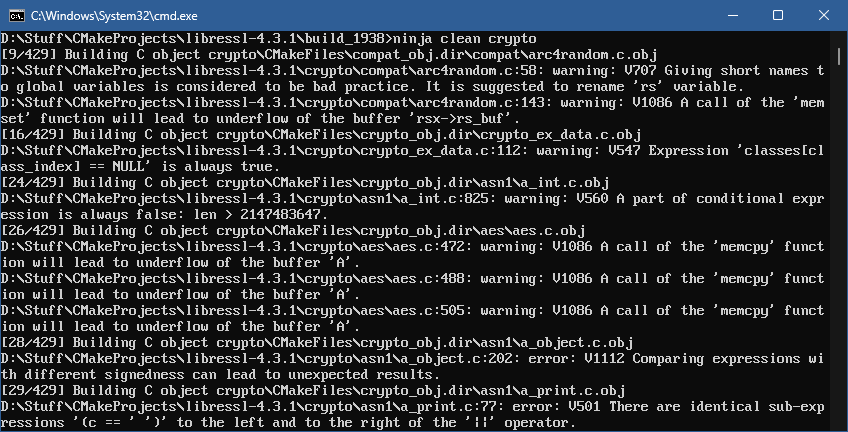
Picture 1. The beginning of the build log file for the libcrypto component from LibreSSL 4.3.1 combined with the PVS-Studio analysis
The process of configuring PVS-Studio static analyzer is almost identical to that of other solutions supported by CMake: simply declare the CMAKE_<LANG>_PVS_STUDIO directive and list the parameters after it, just as if you were running CompilerCommandsAnalyzer on Windows or pvs-studio-analyzer on *nix systems. <LANG> can take the C and CXX values.
set(CMAKE_C_PVS_STUDIO CompilerCommandsAnalyzer analyze -a GA)
set(CMAKE_CXX_PVS_STUDIO CompilerCommandsAnalyzer analyze -a GA)
You can place this directive at any level in CMakeLists.txt, controlling how much code the analyzer checks.
If you want to avoid running the analysis with every build, wrap the configuration in a conditional statement:
if(ENABLE_PVS_STUDIO_CHECKS)
  set(CMAKE_C_PVS_STUDIO CompilerCommandsAnalyzer analyze -a GA)
endif()
Cross-platform projects can also use the automatic naming feature for PVS-Studio executable files in C and C++ projects:
find_program(PVS_STUDIO_COMMAND NAMES
             pvs-studio-analyzer CompilerCommandsAnalyzer)
set(CMAKE_CXX_PVS_STUDIO ${PVS_STUDIO_COMMAND} analyze -a "GA\;OP")
You can also set the -DCMAKE_<LANG>_PVS_STUDIO command-line parameter to avoid changing CMakeLists.txt. Please note that in this case, PVS-Studio's command-line parameters use the ; character as a separator; so, to specify multiple diagnostic rule groups in the -a parameter, escaping is required:
cmake -B build -DCMAKE_C_PVS_STUDIO="CompilerCommandsAnalyzer;analyze;-a;GA\;OP"We checked the CMake 4.1 source code in August 2025. PVS-Studio analyzer for C and C++ detected many interesting things there.
Using the built-in integration to analyze code limits your options for interacting with the analysis results: the PVS-Studio report is not saved, since source code files are analyzed individually. So, the report conversion via plog-converter is unavailable, but you can aggregate analyzer warnings in CDash—a test result monitoring system also developed by Kitware. The developers on the CMake team did just that—you can see the result of the integration here.
We'll go over the analysis process using the example of the LibreSSL cryptographic library, which is a hard fork of OpenSSL designed to improve the codebase quality, security, and maintenance. The examples of command-line commands are written for Windows.
Open the root CMakeLists.txt file and add the following line:
set(CMAKE_C_PVS_STUDIO CompilerCommandsAnalyzer analyze -a "GA\;OP")Then, generate files for the Ninja build system:
cmake -B build -G NinjaNext, run any build target, such as libtls—a new version of the libssl library for TLS connections:
cd build
ninja tls
The build starts, and the analysis begins.
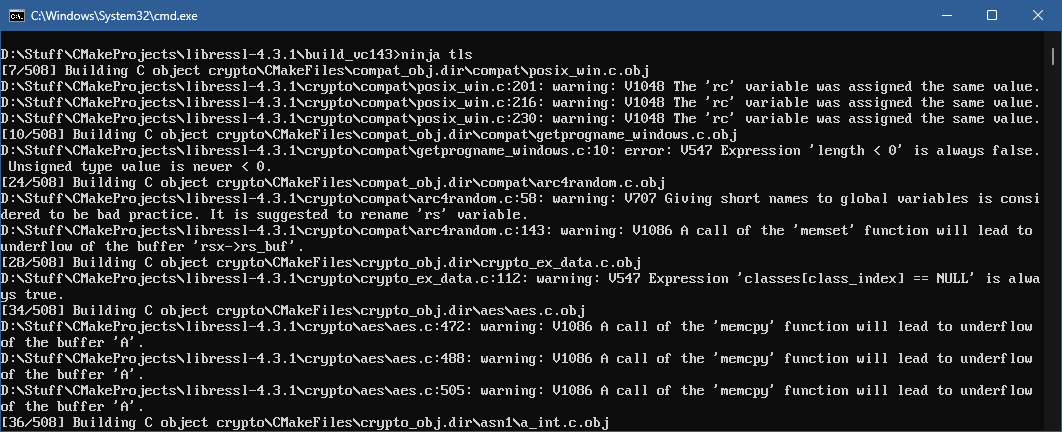
Picture 2. The head of the build log file for the libtls component from LibreSSL 4.3.1 combined with the PVS-Studio analysis
PVS-Studio warnings are displayed in an easy-to-read format: the path to the file with the line number, the diagnostic rule number, and its description. Let's take a look at some warnings from the libcrypto cryptographic library used in libtls:
void
BF_ecb_encrypt(const unsigned char *in, unsigned char *out,
    const BF_KEY *key, int encrypt)
{
    BF_LONG l, d[2];

    n2l(in, l);
    d[0] = l;
    n2l(in, l);
    d[1] = l;
    if (encrypt)
        BF_encrypt(d, key);
    else
        BF_decrypt(d, key);
    l = d[0];
    l2n(l, out);
    l = d[1];
    l2n(l, out);
    l = d[0] = d[1] = 0;              // <=
}
PVS-Studio warning: V1001 The 'l' variable is assigned but is not used by the end of the function. blowfish.c 587
Here's a simple and straightforward Blowfish algorithm. In this case, the data buffer is quickly flushed for encryption or decryption, depending on the value of encrypt. However, the data won't be overwritten if the app was compiled with optimization enabled, and the 12 bytes—8 of which are a data block—will remain in memory.
To read information from X.509 certificates and similar documents, the Abstract Syntax Notation Once (ASN.1) parser is required.
PVS-Studio warning: V501 There are identical sub-expressions '(c == ' ')' to the left and to the right of the '||' operator. a_print.c 77:
int
ASN1_PRINTABLE_type(const unsigned char *s, int len)
{
  int c;
  ....
  while (len-- > 0 && *s != '\0') {
    c= *(s++);
    if (!(((c >= 'a') && (c <= 'z')) ||
        ((c >= 'A') && (c <= 'Z')) ||
        (c == ' ') ||                   // <=
        ((c >= '0') && (c <= '9')) ||
        (c == ' ') || (c == '\'') ||    // <=
        (c == '(') || (c == ')') ||
        (c == '+') || (c == ',') ||
        (c == '-') || (c == '.') ||
        (c == '/') || (c == ':') ||
        (c == '=') || (c == '?')))
      ia5 = 1;
    if (c & 0x80)
      t61 = 1;
  }
  ....
}
We'll stretch it out a bit by placing the conditions in if in a single column:
if (!(
       ((c >= 'a') && (c <= 'z'))
    || ((c >= 'A') && (c <= 'Z'))
    || (c == ' ')                   // <=
    || ((c >= '0') && (c <= '9'))
    || (c == ' ')                   // <=
    || (c == '\'')
    ....
))
And here's the sneaky duplicate space check. We believe this is purely a coincidence :)
You can remove it from any part of the condition without losing any functionality:
if (!(((c >= 'a') && (c <= 'z')) |
    ((c >= 'A') && (c <= 'Z')) ||
    ((c >= '0') && (c <= '9')) ||
    (c == ' ') || (c == '\'') ||
    (c == '(') || (c == ')') ||
    (c == '+') || (c == ',') ||
    (c == '-') || (c == '.') ||
    (c == '/') || (c == ':') ||
    (c == '=') || (c == '?')))
More complex cases involving repeated checks within a condition also exist. To prevent this, you can use table-style code formatting.
The familiar ways of analyzing CMake projects using compile_commands.json and the CMake module haven't gone anywhere—you can still use them. You can find more details in our documentation. Keeping your code bug-free has become even easier, and we hope that integrating static analysis into your development pipeline will be just as easy! If you'd like to try out the new integration now, you can request a free trial license.


0
0
0


0