# What's new in Unity 6? Overview of release updates and source code issues
Unity 6 is finally here\! According to the developers, this is the most stable version in the game engine history\. Why don't we check it using a static code analyzer? We'll also take a brief look at the key features and enhancements the update brings\.

## Introduction
Unity 6 is a global update that aims at improving engine performance and stability but goes far beyond that\. The enhancements cover a variety of aspects: multiplayer tools, lighting system, rendering, post\-processing, the XR\-toolkit, some visual effects, and more\. I'd also like to highlight a system for integrating AI models\.
While the preview of Unity 6 has already been available since May 15, 2024, it seems that many people's curiosity about what makes this update special has only recently arisen\. So, in the first part of the article, I'll give a brief overview of what I think are the most important enhancements\. I won't go into too much detail, though\. Instead, I'll provide links where you can find more information\.
In the second part, you may want to test your code analysis skills by looking for potential errors found by the static analyzer in several code fragments of the open\-source part of the engine\. This exercise is a good way to learn from other people's mistakes and minimize the chance of making them in your own code\.
Enjoy reading the article\!
## What's new in Unity 6?
Okay, let's see what the Unity team has in store for us this time around\.

### AI integration based on artificial neural networks
The [Sentis](https://docs.unity3d.com/Packages/com.unity.sentis@2.0/manual/index.html) framework has been introduced\. It enables developers to integrate pre\-trained neural network models into the runtime environment and use them to implement features such as speech and object recognition, creation of intelligent NPCs, etc\.
### Toolkit extension for creating multiplayer projects
* The new [Multiplayer Center](https://docs.unity3d.com/6000.0/Documentation/Manual/multiplayer-center.html) package serves as a starting point for creating a multiplayer game\. It recommends multiplayer packages based on your project specifications and provides examples and educational materials\.
* The Unity team has introduced [Multiplayer Play Mode](https://docs-multiplayer.unity3d.com/mppm/current/about/)\. It enables users to simulate up to 4 players directly from the Unity Editor\.
* The devs have added the support for [distributed authority topologies](https://docs-multiplayer.unity3d.com/netcode/current/terms-concepts/distributed-authority/) to the Netcode for GameObjects package\. They've also added the [Network Scene Visualization](https://docs-multiplayer.unity3d.com/tools/current/netscenevis/) tool to the Multiplayer Tools package\. It should help debug projects that use the new topology\.
* The team has introduced the [Dedicated Server](https://docs.unity3d.com/Manual/dedicated-server.html) package to support the development of games and applications on a dedicated server platform\.
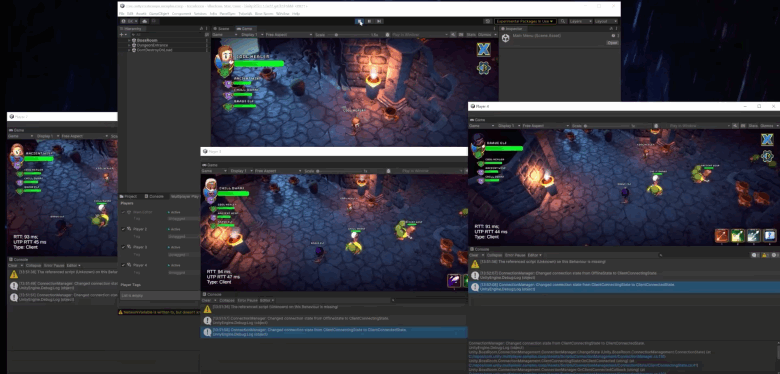
Figure N1 — Multiplayer Play Mode in action
### CPU load optimization
* The new [GPU Resident Drawer](https://docs.unity3d.com/Packages/com.unity.render-pipelines.high-definition@17.0/manual/gpu-resident-drawer.html) rendering system is now available\. The system efficiency is directly related to the average number of object instances in a scene\. The more instances of the same objects \(e\.g\. vegetation created using _SpeedTree_\) present, the more beneficial the system can be\. It has some technical limitations\. For example, it optimizes rendering of object instances with static meshes only\. So, it doesn't work with instances of particle systems and other effects\.
* The devs have added the new [GPU Occlusion Culling](https://docs.unity3d.com/Packages/com.unity.render-pipelines.high-definition@17.0/manual/gpu-culling.html) feature\. It enables Unity to use the GPU instead of the CPU to exclude objects from rendering when they're occluded behind other objects\.
### GPU load optimization
* The new [Foveated Rendering](https://docs.unity3d.com/2022.3/Documentation/Manual/xr-foveated-rendering.html) feature is now available\. It reduces the GPU load in XR projects by reducing the fidelity in the periphery of the user's vision\. The feature is equipped with two modes:
* **Fixed foveated** renders the central region of the screen space for each eye at a maximum resolution and reduces the resolution in the peripheral areas;
* **Gaze\-based foveated** uses eye tracking to determine which regions of the screen space with maximum resolution\.
* The new feature helps reduce GPU load by automatically merging rendering steps in Render Graph\. Users can further optimize the GPU by creating custom steps and native render passes\. I'd also like to note that [Render Graph is now available not only in HDRP but also in URP](https://docs.unity3d.com/6000.0/Documentation/Manual/urp/render-graph-introduction.html)\.
### Better environment rendering quality
* The developers have enhanced sky rendering for sunset and sunrise in HDRP\. They've added the ozone layer support and atmospheric scattering to complement fog at long distances\.
* They've also improved the water rendering in HDRP by adding an underwater volumetric fog effect\.
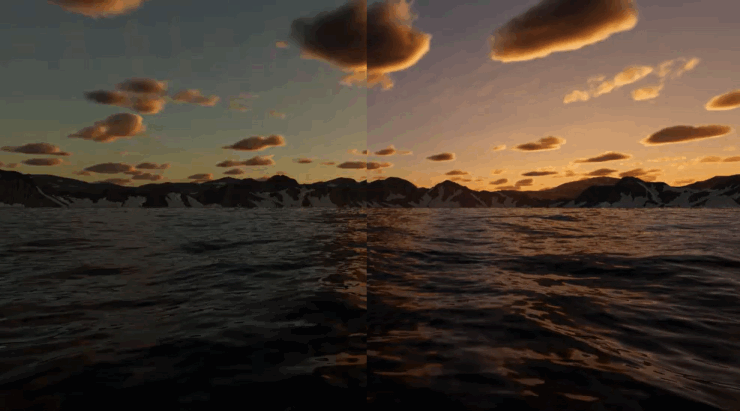
The left side of the image doesn't have the ozone layer effect unlike the right one\.

Underwater Volumetric fog
### Miscellaneous enhancements
* The developers have made significant improvements to the XR toolkit\.
* Unlike previous versions, the Unity 6 Editor now runs on Arm\-based Windows devices\.
* The Unity team has enhanced the build window and added new build profiles\.
* They've also made some lighting\-related enhancements, including a [new way for building global illumination lighting](https://docs.unity3d.com/6000.0/Documentation/Manual/urp/probevolumes.html)\.
* The devs have fixed some known major issues and also improved Shader Graph\.
I found the mentioned changes to be the most significant, but this is by no means a complete list\. You can find a more comprehensive catalog of improvements, as well as their detailed descriptions, [here](https://docs.unity3d.com/6000.0/Documentation/Manual/UnityManual.html)\.
Now that we've learned about the enhancements, it's time to see whether the update has brought new bugs to the engine source code\.
## Dissecting new bugs in game engine code
So, I've equipped myself with the PVS\-Studio code analyzer and investigated the C\# part of the current engine version \([6000\.0\.21f1](https://github.com/Unity-Technologies/UnityCsReference/releases/tag/6000.0.21f1)\), uncovering some interesting potential and explicit errors\. However, instead of simply describing them, I'd like to invite you to test your code\-analysis skills\. Challenge yourself to find errors in the given code fragments and figure out how to fix it\. Each snippet has a full answer below it, so you can check your guesses\.
Let the ~~Hunger Games~~ tests begin, and may the programmer's wits be ever in your favor\! By the way, it'd be awesome if you could share your findings in the comments :\)
### First test
```cpp
public bool propagationHasStopped { get; }
public bool immediatePropagationHasStopped { get; }
public bool defaultHasBeenPrevented { get; }
public EventDebuggerCallTrace(IPanel panel, EventBase evt,
int cbHashCode, string cbName,
bool propagationHasStopped,
bool immediatePropagationHasStopped,
long duration,
IEventHandler mouseCapture): base(....)
{
this.callbackHashCode = cbHashCode;
this.callbackName = cbName;
this.propagationHasStopped = propagationHasStopped;
this.immediatePropagationHasStopped = immediatePropagationHasStopped;
this.defaultHasBeenPrevented = defaultHasBeenPrevented;
}
```
The answer is here
The analyzer message:
[V3005](https://pvs-studio.com/en/docs/warnings/v3005/)\. The 'this\.defaultHasBeenPrevented' variable is assigned to itself\. EventDebuggerTrace\.cs 42\.
For some reason, the _defaultHasBeenPrevented_ property is assigned to itself during initialization\. Since the property has no setter, its value will never change again and will always have the default value of _false_\.
You can fix the issue by adding a new parameter to the constructor to initialize the property\.
Too easy for you? Let's call this one a warm\-up and see how you do next\!
### Second test
```cpp
public void ParsingPhase(....)
{
....
SpriteCharacter sprite =
(SpriteCharacter)textInfo.textElementInfo[m_CharacterCount]
.textElement;
m_CurrentSpriteAsset = sprite.textAsset as SpriteAsset;
m_SpriteIndex = (int)sprite.glyphIndex;
if (sprite == null)
continue;
if (charCode == '<')
charCode = 57344 + (uint)m_SpriteIndex;
else
m_SpriteColor = Color.white;
}
```
The answer is here
The analyzer message:
[V3095](https://pvs-studio.com/en/docs/warnings/v3095/)\. The 'sprite' object was used before it was verified against null\. Check lines: 310, 312\. TextGeneratorParsing\.cs 310\.
The _sprite_ variable is dereferenced before being checked for _null_:
```cpp
m_CurrentSpriteAsset = sprite.textAsset as SpriteAsset;
m_SpriteIndex = (int)sprite.glyphIndex;
if (sprite == null)
continue;
```
If _sprite_ is indeed _null_, this inevitably leads to an exception\. Perhaps the developers didn't consider the importance of operation order when adding string dereferencing to the method\. To avoid the issue, you can move the dereferences under the _null_ check:
```cpp
if (sprite == null)
continue;
m_CurrentSpriteAsset = sprite.textAsset as SpriteAsset;
m_SpriteIndex = (int)sprite.glyphIndex;
```
### Third test
```cpp
private static void CompileBackgroundPosition(....)
{
....
else if (valCount == 2)
{
if (((val1.handle.valueType == StyleValueType.Dimension) ||
(val1.handle.valueType == StyleValueType.Float)) &&
((val1.handle.valueType == StyleValueType.Dimension) ||
(val1.handle.valueType == StyleValueType.Float)))
{
.... = new BackgroundPosition(...., val1.sheet
.ReadDimension(val1.handle)
.ToLength());
.... = new BackgroundPosition(...., val2.sheet
.ReadDimension(val2.handle)
.ToLength());
}
else if ((val1.handle.valueType == StyleValueType.Enum)) &&
(val2.handle.valueType == StyleValueType.Enum)
....
{
}
```
The answer is here
The analyzer message:
[V3001](https://pvs-studio.com/en/docs/warnings/v3001/)\. There are identical sub\-expressions to the left and to the right of the '&&' operator\. StyleSheetApplicator\.cs 169\.
The analyzer prompts that two identical expressions are executed using the _&&_ operator in one of the conditions:
```cpp
if (((val1.handle.valueType == StyleValueType.Dimension) ||
(val1.handle.valueType == StyleValueType.Float)) &&
((val1.handle.valueType == StyleValueType.Dimension) ||
(val1.handle.valueType == StyleValueType.Float)))
```
Obviously, this is an error, and the fix is fairly straightforward\. Look at the rest of the code—it performs similar operations consistently, first using _val1_ and then _val2_\. For example, the condition that follows the one in question, consists of two similar checks:
```cpp
else if ((val1.handle.valueType == StyleValueType.Enum)) &&
(val2.handle.valueType == StyleValueType.Enum)
```
The only difference between the two is that the first one uses the _val1_ value, and the second one uses _val2_\.
So, to fix the error, most likely, the devs need to replace all _val1_ with _val2_ in the repeated expression of the incorrect condition:
```cpp
if (((val1.handle.valueType == StyleValueType.Dimension) ||
(val1.handle.valueType == StyleValueType.Float)) &&
((val2.handle.valueType == StyleValueType.Dimension) ||
(val2.handle.valueType == StyleValueType.Float)))
```
### Fourth test
```cpp
public partial class BuildPlayerWindow : EditorWindow
{
....
internal static event Action
drawingMultiplayerBuildOptions;
....
}
internal static class EditorMultiplayerManager
{
....
public static event Action drawingMultiplayerBuildOptions
{
add => BuildPlayerWindow.drawingMultiplayerBuildOptions +=
(profile) => ....;
remove => BuildPlayerWindow.drawingMultiplayerBuildOptions -=
(profile) => ....;
}
....
}
```
The answer is here
The analyzer message:
[V3084](https://pvs-studio.com/en/docs/warnings/v3084/)\. Anonymous function is used to unsubscribe from 'drawingMultiplayerBuildOptions' event\. No handlers will be unsubscribed, as a separate delegate instance is created for each anonymous function declaration\. EditorMultiplayerManager\.bindings\.cs 48\.
This is a simple yet common error\. Anonymous functions are used here for subscribing to and unsubscribing from an event\. No matter how visually similar they are, these functions are still different objects\. As a result, subscribing to an event is performed correctly, but unsubscribing fails\.
One solution is to implement a full\-fledged method instead of an anonymous function and use for both subscribing to/unsubscribing from the event\.
### Fifth test
```cpp
public void DoRenderPreview(Rect previewRect, GUIStyle background)
{
....
Matrix4x4 shadowMatrix;
RenderTexture shadowMap = RenderPreviewShadowmap(....);
if (previewUtility.lights[0].intensity != kDefaultIntensity ||
previewUtility.lights[0].intensity != kDefaultIntensity)
{
SetupPreviewLightingAndFx(probe);
}
float tempZoomFactor = (is2D ? 1.0f : m_ZoomFactor);
previewUtility.camera.orthographic = is2D;
if (is2D)
previewUtility.camera.orthographicSize = 2.0f * m_ZoomFactor;
....
}
private void SetupPreviewLightingAndFx(SphericalHarmonicsL2 probe)
{
previewUtility.lights[0].intensity = kDefaultIntensity;
previewUtility.lights[0].transform.rotation = ....;
previewUtility.lights[1].intensity = kDefaultIntensity;
....
}
```
The answer is here
The analyzer message:
[V3001](https://pvs-studio.com/en/docs/warnings/v3001/)\. There are identical sub\-expressions 'previewUtility\.lights\[0\]\.intensity \!\= kDefaultIntensity' to the left and to the right of the '\|\|' operator\. AvatarPreview\.cs 721\.
The condition of the first _if_ statement in the _DoRenderPreview_ method consists of two identical subexpressions\. This could be either a bug or simply redundant code left out due to oversight\.
The implementation of the _SetupPreviewLightingAndFx_ method, which uses not only _previewUtility\.lights\[0\]_ but also _previewUtility\.lights\[1\]_, hints at an error here\.
So, this is how you can fix the error:
```cpp
if (previewUtility.lights[0].intensity != kDefaultIntensity ||
previewUtility.lights[1].intensity != kDefaultIntensity)
{
....
}
```
### Sixth test
```cpp
void UpdateInfo()
{
....
var infoLine3_format = "CurrentElement:" +
" Visible:{0}" +
" Enable:{1}" +
" EnableInHierarchy:{2}" +
" YogaNodeDirty:{3}";
m_InfoLine3.text = string.Format(infoLine3_format,
m_LastDrawElement.visible,
m_LastDrawElement.enable,
m_LastDrawElement.enabledInHierarchy,
m_LastDrawElement.isDirty);
var infoLine4_format = "" +
"Count of ZeroSize Element:{0} {1}%" +
" Count of Out of Root Element:{0} {1}%";
m_InfoLine4.text = string.Format(infoLine4_format,
countOfZeroSizeElement,
100.0f * countOfZeroSizeElement / count,
outOfRootVE,
100.0f * outOfRootVE / count);
....
}
```
The answer is here
The analyzer message:
[V3025](https://pvs-studio.com/en/docs/warnings/v3025/)\. Incorrect format\. A different number of format items is expected while calling 'Format' function\. Arguments not used: 3rd, 4th\. UILayoutDebugger\.cs 179\.
Take a look at the second _string\.Format\(\.\.\.\.\)_\. Its format string \(the first argument\) has four slots for insertion\. There are also four values passed for insertion \(from the second to the fifth argument\)\. The issue is that the slots contain only 0 and 1\. As a result, only the first and second values are inserted, while the other two aren't used at all\.
The corrected format string looks as follows:
```cpp
var infoLine4_format = "" +
"Count of ZeroSize Element:{0} {1}%" +
" Count of Out of Root Element:{2} {3}%";
```
### Seventh test
```cpp
protected static bool IsFinite(float f)
{
if ( f == Mathf.Infinity
|| f == Mathf.NegativeInfinity
|| f == float.NaN)
{
return false;
}
return true;
}
```
The answer is here
The analyzer message:
[V3076](https://pvs-studio.com/en/docs/warnings/v3076/)\. Comparison of 'f' with 'float\.NaN' is meaningless\. Use 'float\.IsNaN\(\)' method instead\. PhysicsDebugWindowQueries\.cs 87\.
The error here relates to a not\-so\-obvious behavior\. A comparison of two values that are equal to _NaN_ is always false\. So, as the analyzer prompts, we need to use _float\.IsNaN\(f\)_ instead of the _f \=\= float\.NaN_ expression here\.
### Eighth test
```cpp
public readonly struct SearchField : IEquatable
{
....
public override bool Equals(object other)
{
return other is SearchIndexEntry l && Equals(l);
}
public bool Equals(SearchField other)
{
return string.Equals(name, other.name, StringComparison.Ordinal);
}
}
```
The answer is here
The analyzer message:
[V3197](https://pvs-studio.com/en/docs/warnings/v3197/)\. The compared value inside the 'Object\.Equals' override is converted to the 'SearchIndexEntry' type instead of 'SearchField' that contains the override\. SearchItem\.cs 634\.
As the analyzer message states, in the first _Equals_ method, the _other_ parameter is incorrectly converted to the _SearchIndexEntry_ type instead of _SearchField_\. This results in the same method overload being invoked when _Equals\(l\)_ is called later\. However, if _other_ is really of the _SearchIndexEntry_ type, the code loops\. So, the _StackOverflowException_ will be thrown\.
### Ninth test
```cpp
private void DrawRenderTargetToolbar()
{
float blackMinLevel = ....;
float blackLevel = ....;
float whiteLevel = ....;
EditorGUILayout.MinMaxSlider(....);
float whiteMaxLevel = ....;
if (blackMinLevel < whiteMaxLevel && whiteMaxLevel > blackMinLevel)
{
m_RTBlackMinLevel = blackMinLevel;
m_RTWhiteMaxLevel = whiteMaxLevel;
m_RTBlackLevel = Mathf.Clamp(blackLevel,
m_RTBlackMinLevel,
whiteLevel);
m_RTWhiteLevel = Mathf.Clamp(whiteLevel,
blackLevel,
m_RTWhiteMaxLevel);
}
}
```
The answer is here
The analyzer message:
[V3001](https://pvs-studio.com/en/docs/warnings/v3001/)\. There are identical sub\-expressions 'blackMinLevel < whiteMaxLevel' to the left and to the right of the '&&' operator\. FrameDebuggerEventDetailsView\.cs 364\.
Again, we have the _if_ statement with the condition consisting of two essentially identical expressions, which differ from each other only in the operand order\. It should probably be something else instead of _blackMinLevel_ in the second expression\. A review of the surrounding code suggests that _whiteLevel_ would be the most logical option\. So, the fixed condition could look as follows:
```cpp
if (blackMinLevel < whiteMaxLevel && whiteMaxLevel > whiteLevel)
{
....
}
```
### Tenth test
```cpp
internal static IEnumerable FindByPackage(PackageInfo package, ....)
{
if (string.IsNullOrEmpty(package?.upmReserved) &&
string.IsNullOrEmpty(package.resolvedPath))
{
return Enumerable.Empty();
}
try
{
IEnumerable> samples = null;
var upmReserved = upmCache.ParseUpmReserved(package);
if (upmReserved != null)
samples = upmReserved.GetList<....>("samples");
....
}
....
}
```
The answer is here
The analyzer message:
[V3042](https://pvs-studio.com/en/docs/warnings/v3042/)\. Possible NullReferenceException\. The '?\.' and '\.' operators are used for accessing members of the 'package' object\. PackageSample\.cs 102\.
The check at the beginning of the method aimed to handle several cases at once:
* when _package\.upmReserved_ is _null_ or an empty string;
* when _package\.resolvedPath_ is _null_ or an empty string;
* when _package_ is _null_\.
However, it doesn't work correctly in most cases:
* if _package_ is _null_, the _NullReferenceException_ is thrown during dereferencing in the second subexpression of the check;
* if either _package\.upmReserved_ or _package\.resolvedPath_ is _null_ or an empty string \(but not both at once\), the method doesn't exit as expected\.
The developers may have used the operator _&&_ instead of \|\| by mistake\. So, the fixed check can look like this:
```cpp
if (string.IsNullOrEmpty(package?.upmReserved) ||
string.IsNullOrEmpty(package.resolvedPath))
{
return Enumerable.Empty();
}
```
### Eleventh test
```cpp
[RequiredByNativeCode]
internal static void InvalidateAll()
{
lock (s_Instances)
{
foreach (var kvp in s_Instances)
{
WeakReference wr = kvp.Value;
if (wr.IsAlive)
(wr.Target as TextGenerator).Invalidate();
}
}
}
```
The answer is here
The analyzer message:
[V3145](https://pvs-studio.com/en/docs/warnings/v3145/)\. Unsafe dereference of a WeakReference target\. The object could have been garbage collected between checking 'IsAlive' and accessing the 'Target' property\. TextGenerator\.cs 140\.
Despite the small amount of code, this is probably the most complex error in the article\. Here are the reasons why:
1. Not everyone is familiar with the concept of _WeakReference_\. The garbage collector can always remove the object referenced by a weak reference, despite the presence of that reference\.
1. The _WeakReference\.IsAlive_ property enables you to check whether the object referenced by the weak reference still exists\. However, this code ignores the possibility that the object can be cleaned up after passing the check but before the reference is dereferenced\. As a result, the _NullReferenceException_ may be thrown anyway\.
1. One would assume that the _lock_ operator could protect the object from the garbage collector\. However, after reproducing the case, I learned that this wasn't true\.
How can you protect yourself from the _NullReferenceException_, then? To avoid the _NullReferenceException_ for sure, one needs to create a strong reference to the object\. Then, the garbage collector will no longer delete it as long as the reference is relevant\. In other words, create a simple local variable referring to the object and work with it\. The safe method can look like this:
```cpp
[RequiredByNativeCode]
internal static void InvalidateAll()
{
lock (s_Instances)
{
foreach (var kvp in s_Instances)
{
WeakReference wr = kvp.Value;
var target = wr.Target;
If (target != null)
(target as TextGenerator).Invalidate();
}
}
}
```
## Conclusion
So, how'd you do? Aren't you tired yet? Okay, now it's time to take a break, as the article is coming to an end\. I hope you found it not only useful but also enjoyable\.
Looking for errors even in such small code fragments can be challenging, but it's almost impossible to detect them in the code of such a large project as the _Unity Editor_\. Unless, of course, you use special software tools\.
You can try the tool I used to detect the potential issues described for free: just request a trial version on the [PVS\-Studio website](https://pvs-studio.com/en/pvs-studio/try-free/)\.
By the way, you can use the PVS\-Studio code analyzer to check not only the Unity engine but also games developed with it\. More information on this you can find in the [documentation](https://pvs-studio.com/en/docs/manual/6607/)\.
See you in the next articles\!